On this page
Overview and architecture
ContextBase indexes documents and returns matching passages or answers with sources. Each Space has its own models, pipelines and access rules.
C4 containers
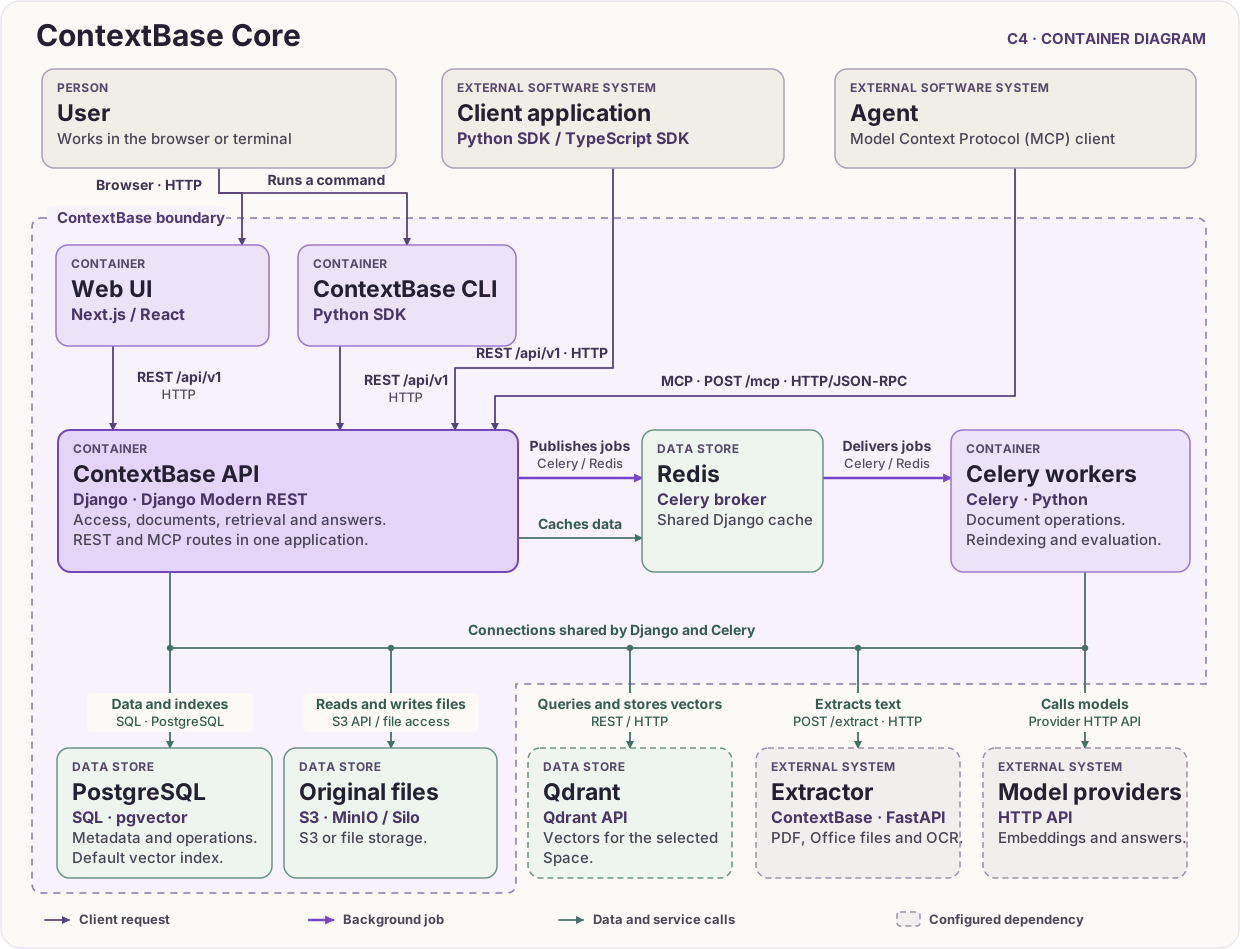
C4 container diagram ·
Full-size SVG
Path of a document
ContextBase saves the original, extracts text, splits it into passages and writes search data to the Space’s indexes. The built-in decoder reads UTF-8 text files. For PDFs, Office files and scans, the API and workers can send files over HTTP to the separate ContextBase Extractor service.
A regular REST upload processes the file in the request. In a managed Space, a dedicated command to upload or replace an original queues the work. Celery workers receive document processing, reindexing and evaluation jobs through the Redis broker.
Path of a request
The web UI, CLI and SDKs call the REST API built with Django Modern REST.
An agent’s MCP client sends JSON-RPC over HTTP to the /mcp route in the
same Django application.
Django checks access, runs the Space’s retrieval pipeline and returns ranked passages with their sources. To generate an answer, the pipeline passes the question and matching passages to the configured language model.
Data and storage
PostgreSQL holds settings, access rules and metadata. Dense vectors default to PostgreSQL with pgvector. Each Space can use another vector backend such as Qdrant, Chroma or Weaviate.
Originals live in the filesystem or an S3-compatible store. The quickstart uses the
minioservice with the Silo image.Redis backs the Celery queues and Django’s shared production cache. By default, the broker and cache use separate logical databases.
Choose a starting point
Task |
Guide |
|---|---|
Run a search on a sample handbook |
|
Connect an existing vector collection |
|
Call document search from an application or agent |
Integrate ContextBase for REST, SDKs and MCP |
Tune retrieval on your own questions |