On this page
Installation and quickstart
Start Docker with a Compose version that supports --wait. Once a stable
release is published, run this command in your terminal. The installer
verifies the release archive and pulls the prebuilt images.
curl -fsSL https://docs.contextbase.nextproduct.tech/install.sh | sh
Open the /setup URL the installer prints when ContextBase is ready.
Find a passage
Select Create administrator. If setup asks who may create Spaces, select Allow Space creators.
Wait for the installation check. The first run downloads the BGE-M3 embedding model for CPU search.
Select Use my documents, name the Space
Next Product Lab Demoand select Create my Space. Upload thesample guideand wait for indexing.In Search, enter How early should I prepare draft release notes before the demo? and select Find.
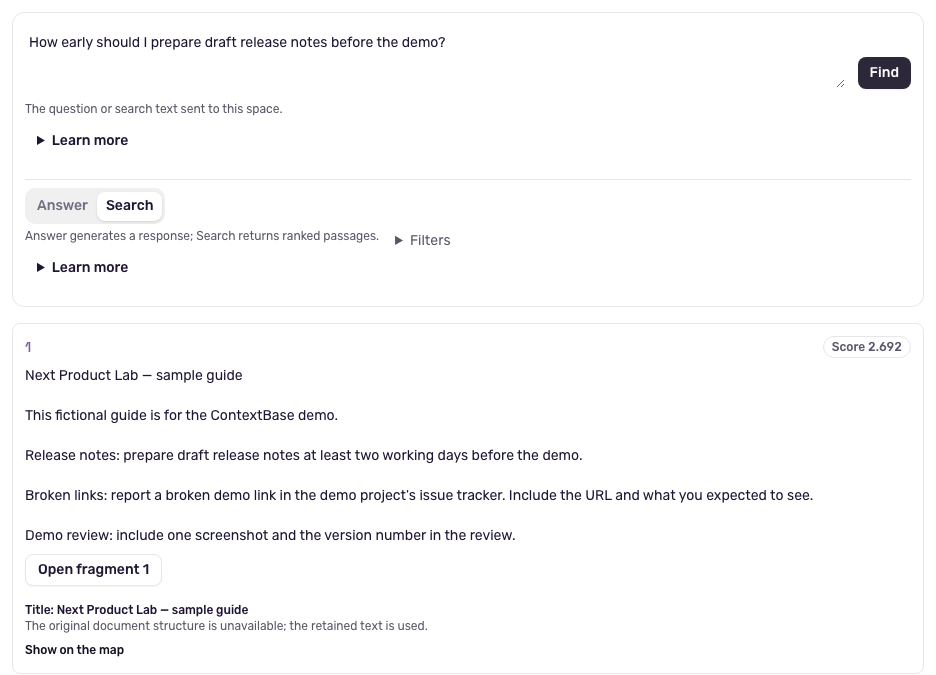
The guide says to prepare the draft at least two working days before the demo.
Add your own file
Upload a UTF-8 .txt or .md file, wait for indexing and search for
a fact in it. Select Finish setup when done.
For PDFs, Office files or OCR, configure extraction.
Connect answers
Select Connect answers in setup. If setup is complete, open /setup
and select Continue setup, then Continue on the installation check.
Enter the provider’s model ID and any required
credentials. A custom endpoint must be reachable from the containers.
Select Check and connect answers. In Answer, check the response
against the passage shown below it.
See Generate answers and inspect their sources for provider settings and source handling.
If setup stalls
Follow the error message and rerun the same install command. The installer
keeps the selected release and data. See ~/.contextbase/install.log
for startup details.
If you already have install-contextbase.sh, contextbase-compose.tar.gz
and contextbase-compose.tar.gz.sha256 from the same release, run
sh install-contextbase.sh --release-dir . in that directory. Docker
must be able to reach the image registry.
See Diagnose common failures for health checks, indexing and model errors. For a server, follow Deploy over HTTPS.